Staying on top of Xero’s latest changes is essential for keeping your business efficient and compliant. Here’s a roundup of what’s live now and what’s rolling out soon plus how these updates can make your life easier.
1. New Menu (Live Now) and Homepage (Rolling Out)
Xero has introduced a streamlined navigation menu designed to make finding what you need faster and more intuitive.

What’s changed?
Cleaner layout with grouped features for easier access.
Improved search functionality.
Homepage update:
Rolling out over the next few months, the new homepage will give you a customisable dashboard with quick links to your most used tools. Here’s a sneak peak at what it will look like:
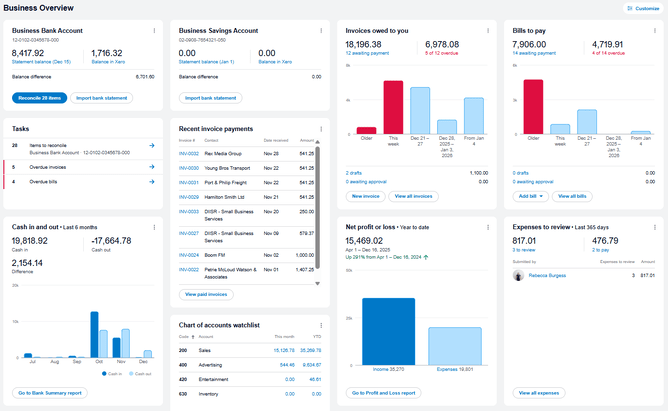
You will be able to customise what you can see on your homepage to keep it relevant to you. Check out the video below to show how you can easily make your new homepage work for you:
You can read more about the changes to the homepage in Xero's official update here.
2. New Xero Files Layout
If you use Files in Xero for storing documents, you will have noticed a new look recently.
So What’s new?
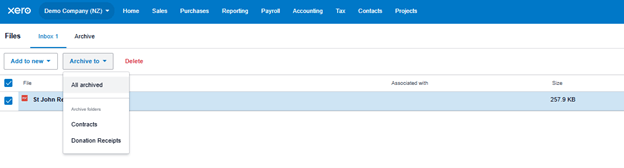
A refreshed Xero Files interface for easier uploading and organising. The file library is now split into an inbox and archive to help organize files.
Drag and drop functionality and improved folder navigation.
Why it matters:
Faster document management means less admin time and better record keeping
3. JAX (Just Ask Xero) & Auto-reconciliation
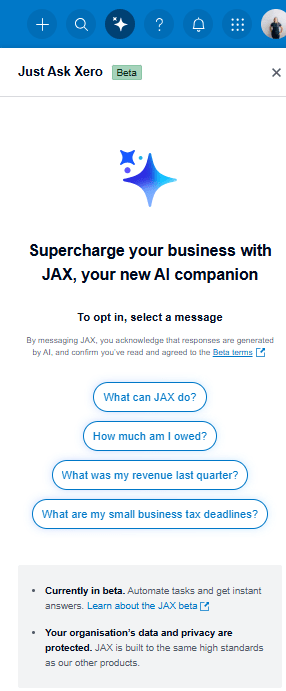
AI is all around us now and Xero is introducing JAX, its AI-powered assistant, to help you get answers quickly. Some initial features are already available with further improvements coming over the coming months.
Features:
Ask questions about Xero features and get instant guidance.
Integrated with your workflow for real-time support.
You can also link JAX with your mobile (SMS or WhatsApp) or email to talk to JAX to complete simple tasks such as creating a draft invoice or quote.
Here's the current breakdown of functions in JAX:
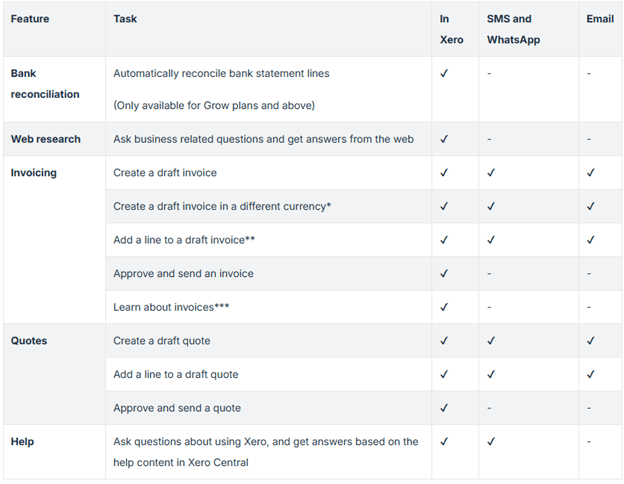
Auto Reconciliation:
This is one of the biggest features available from JAX so far. AI-driven suggestions for matching transactions, with the aim of reducing manual work and errors. You can turn this on and off from your bank reconciliation screen (if available to your organisation).
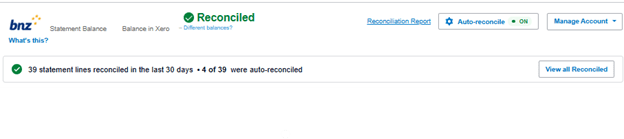
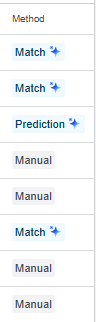
You can check how transactions have been reconciled by selecting ‘View all reconciled’. This will allow you to check and review the transactions that Jax has reconciled for you and make updates if needed.
Explore more about JAX and auto-reconciliation: https://blog.xero.com/product-updates/automatic-bank-reconciliation-jax-beta/
4. Xero Payroll Changes
Payroll accuracy is critical, and Xero has updated its leave calculation process to better align with compliance requirements.
What's Changed?
Enhanced calculations for annual leave and other entitlements. Xero is moving to showing leave balances in weeks and days rather than hours. It also allows you to assign employment types (permanent, fixed-term, or casual).
Better visibility for employees and employers.
Impact:
Reduces the risk of underpayment or miscalculation
Better alignment with the current Holidays Act
Xero has created a tool to guide you through this process but reviewing and checking your current leave is correct before making the change is critical. We can help with a Payroll Leave Review if required to ensure the data you have in Xero payroll is correct before making the change. We can even complete the conversion for you.
What can you do now?
Review your Xero settings and update templates.
Train your team on the new navigation and features.
Check payroll settings and review leave balances.
Need help implementing these changes? Varntige can support you with Xero training, payroll setup, and ongoing bookkeeping. Contact us today at info@varntige.co.nz to make sure your business is ready for 2026.